 SonusCue
Sound cueing for theatre and live events
Every sound cue,
one GO button.
SonusCue plays your show's sound in order. Build a cue list, set fades and levels, then run the show with GO. Cues can also be fired by MIDI, OSC, timecode, DMX or a phone, and can send their own commands to lighting and video.
What it does
Built for the booth
The cue list, the editor and the controls are laid out for running a show in the dark, under pressure, with no surprises.
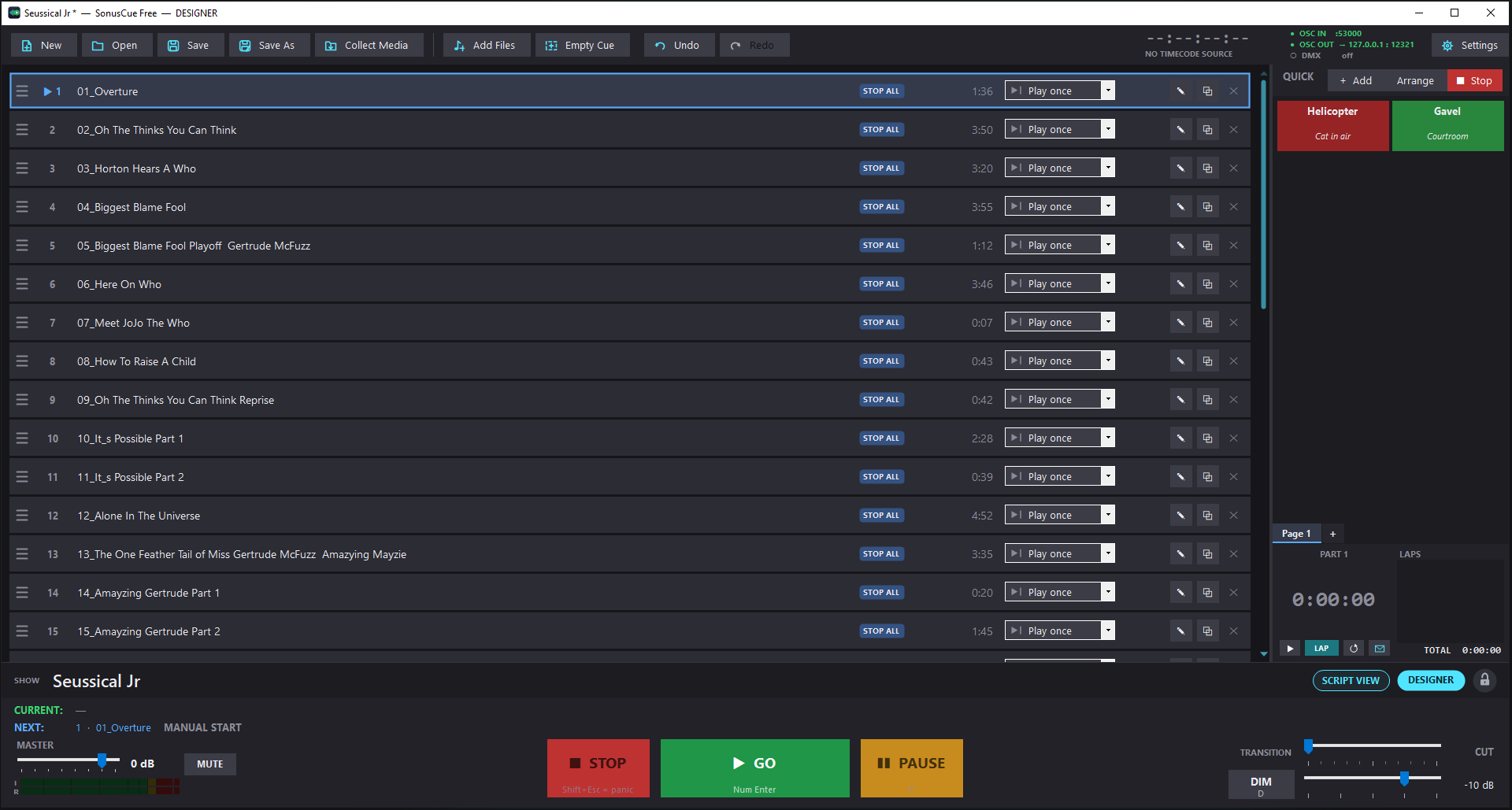
Cue list and GO
Drop in audio files and they become numbered cues. GO plays the cue at the playhead and moves to the next. STOP, PAUSE and PANIC fade over times you set.
Quick hits
A grid of sound buttons for doorbells, phones and anything that happens off-book. Color them, size them and give them keys.
The cue editor
Trim on the waveform, set fade in and out, and draw volume and pan changes over time. Preview on headphones without the audience hearing it.
Play modes
Play once, loop a set number of times, loop until stopped, or carry on into the next cue after a post-wait. Duck other cues while one plays.
Triggers
Start, stop or panic any cue from a key, a MIDI note or an OSC message. Pro adds timecode, time-of-day and Art-Net DMX triggers.
Web remote
Any phone or tablet on the same Wi-Fi runs the show from its browser, protected by a 6-digit PIN. Nothing to install.
Designer and show runner
The designer builds the show. The show runner can run it but can't change it. A PIN-protected console lock stops stray clicks mid-show.
Keeps going
If the sound card drops out, the show keeps time silently and reconnects by itself. After a crash, SonusCue offers to bring the show back with its unsaved changes and the playhead where it was.
Show control
Talks to the rest of the rig
SonusCue can follow other equipment, and lead it. A cue can be fired by your lighting desk, and a cue can fire your lighting desk.
→ In: what can fire a cue
- Keyboard: any key per cue or quick hit. Free
- MIDI: a note on any channel, or on one you choose. Free
- OSC: built-in commands for the whole show, plus a custom address per cue. Free
- Timecode: MTC or LTC at 24, 25, 29.97 DF or 30 fps. Pro
- Time of day: fire a cue at a set clock time. Pro
- Art-Net DMX: triggers, main-screen controls and a DMX monitor. Pro
← Out: what a cue can send
- OSC messages to named destinations such as a lighting console, a video server or another SonusCue. Ultimate
- MIDI: notes, program and control changes, MIDI Show Control and raw SysEx. Ultimate
- DMX levels over Art-Net, with a fade time. Ultimate
- Timecode output (MTC or LTC) that runs with the cue. Ultimate
- OSC status: what's playing and what's next, sent to other devices. Free
Messages sit on the cue Ultimate
Each cue has a Show control tab. Add a row, choose whether it goes when the cue starts or when it stops, pick a destination and type the message. A delay can hold it back. A tick or a cross next to each row shows whether it's valid before you save, and Send now tests it.
# OSC
/eos/cue/1/5/fire
/gma3/cmd "Go+ Executor 201"
# MIDI
NOTE 1 60        PC 1 5        MSC GO 5
# DMX (channels → level, fade)
1-4, 10 → 255   fade 2.5 s
Script View Ultimate
Run the show from the script
Open the script as a PDF and place your cues on the page, where they happen. Press F12 to switch between the cue list and the script.
- Cue buttons on the page. Drag a cue from the cue list onto the line where it goes. Press the button to fire it.
- Notes for each operator. Highlights, pen marks and notes are kept in note sets: the master set and one for each operator.
- Follows the show. The script scrolls to the cue that's playing, or scrolls at a tempo you set for each cue.
- Tabs and Find. Tab the acts and scenes, and search the script with Ctrl+F.
- The console is there too. GO, STOP, PAUSE and PANIC, the master and transition faders, meters, MUTE and DIM.
- Remote pages. Turn pages and jump to tabs over OSC.
Also in SonusCue
For bigger shows
Effects Pro
Reverb, delay, parametric and graphic EQ, compressor, pitch and speed on any cue, with changes over time and presets.
Rehearsal window Pro
Loop a section between IN and OUT, and change speed and pitch for a dance or a vocal rehearsal. It can be run from the web remote.
Media Pro
Use the audio from video files, add YouTube links as cues, and render, convert or export audio.
Cue pages and containers Ultimate
Split a long show into pages, and group cues into containers that GO plays as one.
Devamp Ultimate
A cue loops until the next GO, then plays its current pass to the end before the next cue follows.
Surround Ultimate
5.1, 7.1 and 7.2 outputs. Send a cue to a speaker pair or a single speaker, or place it in the room with the panner.
Editions
Free, Pro and Ultimate
One download for all three. Pro and Ultimate are unlocked with a license key in Settings → License. Show files are the same in every edition.
| Feature | Free$0No time limit | Pro$30License key | Ultimate$70License key |
|---|---|---|---|
| Running the show | |||
| Cue list with GO, STOP, PAUSE and PANIC | ✓ | ✓ | ✓ |
| Quick hits | ✓ | ✓ | ✓ |
| Trim, fades, volume and pan changes over time | ✓ | ✓ | ✓ |
| Play modes, ducking, post-wait, GO lock | ✓ | ✓ | ✓ |
| Show timer (times can be emailed) | ✓ | ✓ | ✓ |
| Designer and show runner levels, console lock | ✓ | ✓ | ✓ |
| Waveforms in the cue list | ✕ | ✓ | ✓ |
| Rehearsal window (loop, speed, pitch) | ✕ | ✓ | ✓ |
| Devamp | ✕ | ✕ | ✓ |
| Triggers and remote control | |||
| Keyboard, MIDI and OSC triggers | ✓ | ✓ | ✓ |
| OSC control and OSC status output | ✓ | ✓ | ✓ |
| Web remote for phones and tablets | ✓ | ✓ | ✓ |
| Timecode triggers (MTC, LTC) | ✕ | ✓ | ✓ |
| Time-of-day triggers | ✕ | ✓ | ✓ |
| Art-Net DMX triggers, controls and monitor | ✕ | ✓ | ✓ |
| Show control out | |||
| OSC and MIDI messages sent by cues | ✕ | ✕ | ✓ |
| DMX levels sent by cues (Art-Net) | ✕ | ✕ | ✓ |
| Timecode output (MTC, LTC), and cues that follow it | ✕ | ✕ | ✓ |
| Script and organization | |||
| Script View | ✕ | ✕ | ✓ |
| Cue pages and container cues | ✕ | ✕ | ✓ |
| Cue tools: export / import cues, match loudest peaks | ✕ | ✕ | ✓ |
| Audio and media | |||
| Stereo output; WaveOut, WASAPI and ASIO drivers; preview output | ✓ | ✓ | ✓ |
| Effects | ✕ | ✓ | ✓ |
| Render, convert and export audio | ✕ | ✓ | ✓ |
| YouTube cues and audio from video files | ✕ | ✓ | ✓ |
| Surround 5.1, 7.1 and 7.2 with pannerMultichannel files play as recorded | ✕ | ✕ | ✓ |
Prices are in US dollars. A Pro or Ultimate license can be active on two computers at a time, and includes free minor version upgrades (for example 1.2 to 1.3) for one year from purchase.
A show made in Pro or Ultimate opens in every edition and plays what that edition can. Effects are skipped and surround plays in stereo. The file isn't changed.
Download